3 Statistical Data
3.1 Types of Data
3.1.1 Definitions
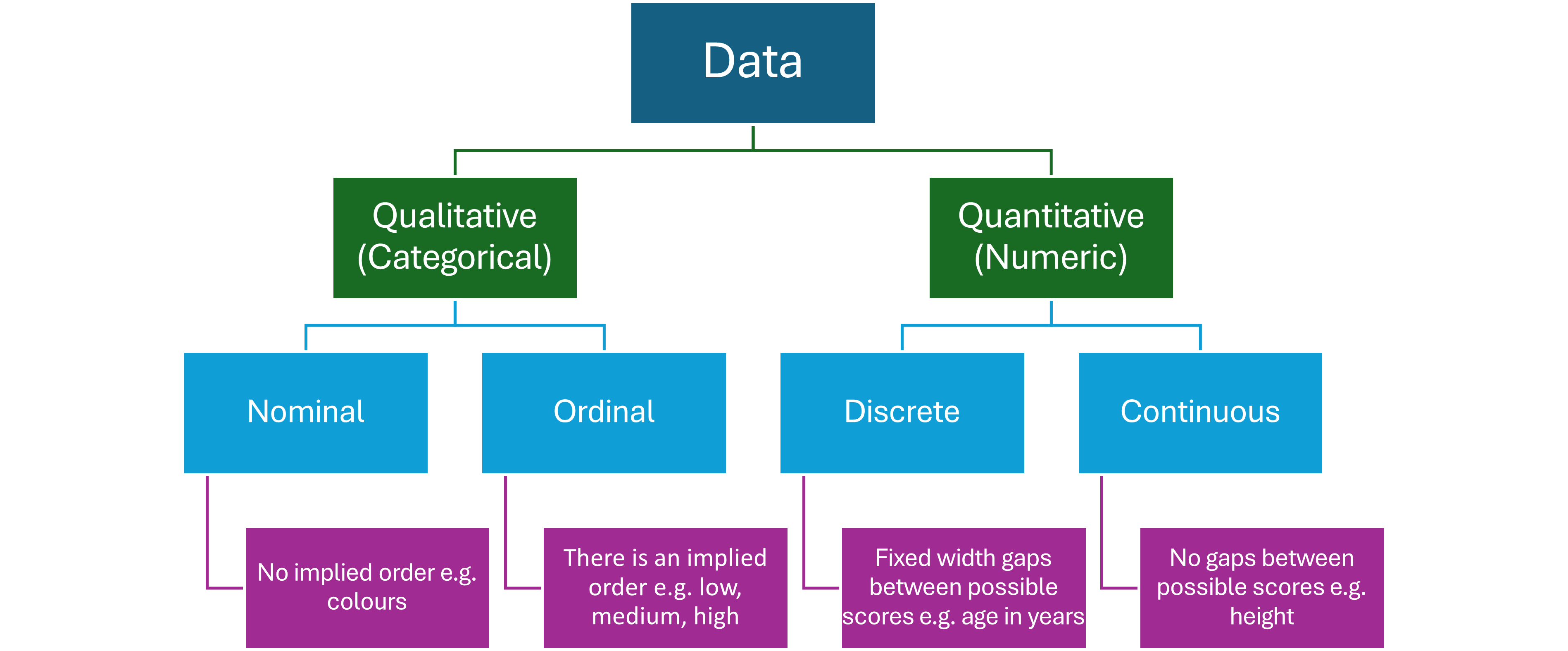
Quantitative Data : Data that is a measurement.
Discrete Data : Measurements made on a scale with gaps of a fixed width e.g. number of birds at a study site.
Continuous Data : Measurements made on a scale with no (theoretical) gaps e.g. lengths of fish in a river.
Qualitative (Categorical) Data : Data that are categories.
Nominal : Categories without an assumed order e.g. fur colour of dogs.
Ordinal : Categories with an assumed order e.g. small, medium, large.
3.1.2 Type of Data Flowchart
3.2 Structure of Statistical Data
Data should be structured using tables in which
- each column represents a variable
- the values in each column are the same type and the same unit
- the first row contains the names of the variables without any spaces
The data in each row represents a single observation of the variables. Observations are often called records or cases, depending on the context of the study. Similarly, columns are often called attributes, features or fields.
3.3 File Formats For Data Storage and Exchange
The most common format for storing and exchanging data for statistical analysis is comma separated values (CSV). CSV is a plain text file with fields separated by commas. Numeric data is unquoted and text data is surrounded by quotation marks. CSV files usually have the extension “.csv”.
The following is an example of CSV file contents. The first row is the column headers, and the remaining rows are observations. You should not need to edit a CSV in a text editor. Statistical software will load and save this format for you.
"Sepal.Length","Sepal.Width","Petal.Length","Petal.Width","Species"
5.1,3.5,1.4,0.2,"setosa"
4.9,3,1.4,0.2,"setosa"
4.7,3.2,1.3,0.2,"setosa"